How Continuous Delivery raises the bar on compliance
Where we understand how Continuous Delivery allows us to continuously release fully compliant high quality software that stand up to regulatory scrutiny. By building quality in and automating all manual processes.
The problem
Over the years I have found that many teams are struggling with synchronising any number of different sources of truth. Requirements in one place, risk assessments in a different place, tests in a third, infrastructure in yet another. When release time comes, sorting out which artefacts belong to which version can take days or even months. In regulated industries, this becomes critical: without a clear trace from requirement to implementation to evidence, audits turn into costly reconstruction exercises years later.
Inspecting quality in and having long and difficult release processes gets worse over time. It incurs technical debt and increases complexity. Which in turn makes the team go slower and slower. It’s a vicious cycle, continuously getting worse.
Working with Continuous Delivery, as described by Dave Farley and Jez Humble in their book with the same name, changes the game completely. By automating everything we can automate and by strongly collaborating to ensure that everyone knows what needs to be done.
Strong Collaboration
When we gather everyone who has relevant knowledge about the problem to be solved. Into the same room at the same time. And solve the problem together. Especially if we do so continuously. This is what I call strong collaboration.
This way of working facilitates fast learning and knowledge transfer. It ensures that we can understand problems, risks, and solutions from as many angles as possible. It allows us to build quality in rather than inspect for it after the fact.
Specifications
One of the things we do in continuous delivery to simplify our life is to only have one source of truth. One place where we keep everything that makes up the software we are building. This includes all application code, all tests, all documentation and specifications, all infrastructure, all automation, and so on.
What I commonly see in teams who have these things in separate places is some people write documentation and specifications, others write the code.
To put everything in one place we make it all code. Documentation and specifications as well as all the other stuff. That does not mean that we expect people who are not engineers to write code. But we expect everyone to collaborate on creating the specifications.
Specifications as code are typically written in lightweight formal languages that read like natural language. Engineers version these alongside the code, collaborating with domain experts to ensure the “what” is correctly captured while engineers handle the “how.”
Without strong collaboration mistakes are often made. When we come together and really understand what needs to be done and how to do it such mistakes are usually caught early. So we do this work in the same room at the same time.
This way of working creates a place where the whole team, engineers and business and quality and others, can learn from each other. Where we can create a shared understanding, a shared mental model, of what we are creating. Where we store that model in a place where everyone can easily access it. And where it evolves together with the implementation of the application.
By continuously maintaining a shared understanding of where the software is going we can turn the vicious cycle around. No matter if we started out with bad practices, by introducing good practices we break the downward spiral and introduce a virtuous cycle instead.
Slicing
One important enabler is to reduce the complexity of each thing we work on. Big features or stories, taking weeks to complete, often also comes with less quality. The reason is that there are to many moving parts that the engineers have to keep in their head.
Working with the engineers to define the specifications will allow you to help them slice such work into far smaller pieces. Whilst also understanding what is critical in each piece of work. This allows us to build the right kind of quality into each slice.
This means that the pieces that are critical from a quality perspective, such as data integrity, process flows, security aspects, privacy, to name a few, will be built with all the attention they need. Other things will therefore also increase in quality, but of a different kind.
Each slice allows you to consider risk on a much more granular level too. In regulated contexts, not all slices carry the same regulatory weight — some touch critical processes or data, others don’t. By linking risk assessment to slicing, teams can focus validation and evidence-gathering efforts where the risk truly lies, avoiding over-documentation.
For example, if a button has this or that colour is usually not considered critical. When making such changes we don’t need to trace it back to a requirement that is critical for compliance. This gives the engineering team freedom to explore and perfect the usability of the software with more focus on exactly that. Without risking that critical aspects of the software is changed in the process.
On the other hand, if the changes touches data integrity, the team knows the importance. They will be able to focus on the criticality of this code. Knowing that such changes do not trip up the user experience.
Only strong collaboration with everyone who has the relevant knowledge can enable this level of quality. And slicing things into cohesive parts that focus on one thing is the work we do to make this happen.
Value Stream Mapping
To speed up the learning process we recommend teams to continuously work with Value Stream Mapping. Revisit the map each quarter at least. Look at how value flows, from the idea of what may be valuable to actual value to users and stakeholders.
Value Stream Mapping is all about understanding how you got to value to user/customer (the right hand side) from an idea of value. We start with the end, value to user/customer, and work our way backwards.

What you can see here is a simplified version of a Value Stream Map (high level) that shows where a team collaborate more. And where sign-offs are made, if needed.
Traceability
Up until this point we have focused on making sure the whole team knows what needs to be done. Now we will look at how we use this knowledge to structure the code, including documentation and specifications, using that knowledge.
We will also look at how we can prove to others that the team knew what needed to be done. Something that is essential in regulated industries. And how we can use tagging to enable this.
Structure == Software Design
Software design is all about creating a structure that allows the team to make the changes needed in a clear and simple way without changing what does not need to change. To make sure that things are ordered in a cohesive way that makes things easy to find. And that ensures that the blast radius of a change is contained.
I mentioned above, when talking about slicing, that we don’t want to change compliance critical things together with non-critical things. If we can at all avoid it. Software design is about making this possible.
By collaborating on understanding what we are about to do, by creating a shared language with clearly defined concepts, we have the knowledge needed to create such a design. This allows us to create software components that embodies the concepts. Create tests that ensures that they live up to specifications. And ensure that we don’t change them when they don’t need to.
It also makes it clear how to navigate the different parts of the codebase. Where to find specifications, tests, application code, and so on, for each of these things.
Tagging
Not everything can be made clear with a file structure, which is the level of detail structure will offer you when working with specifications and other documentation. To address this we can use something called tagging. This is a way to add metadata to parts of a specification to highlight that it is critical.
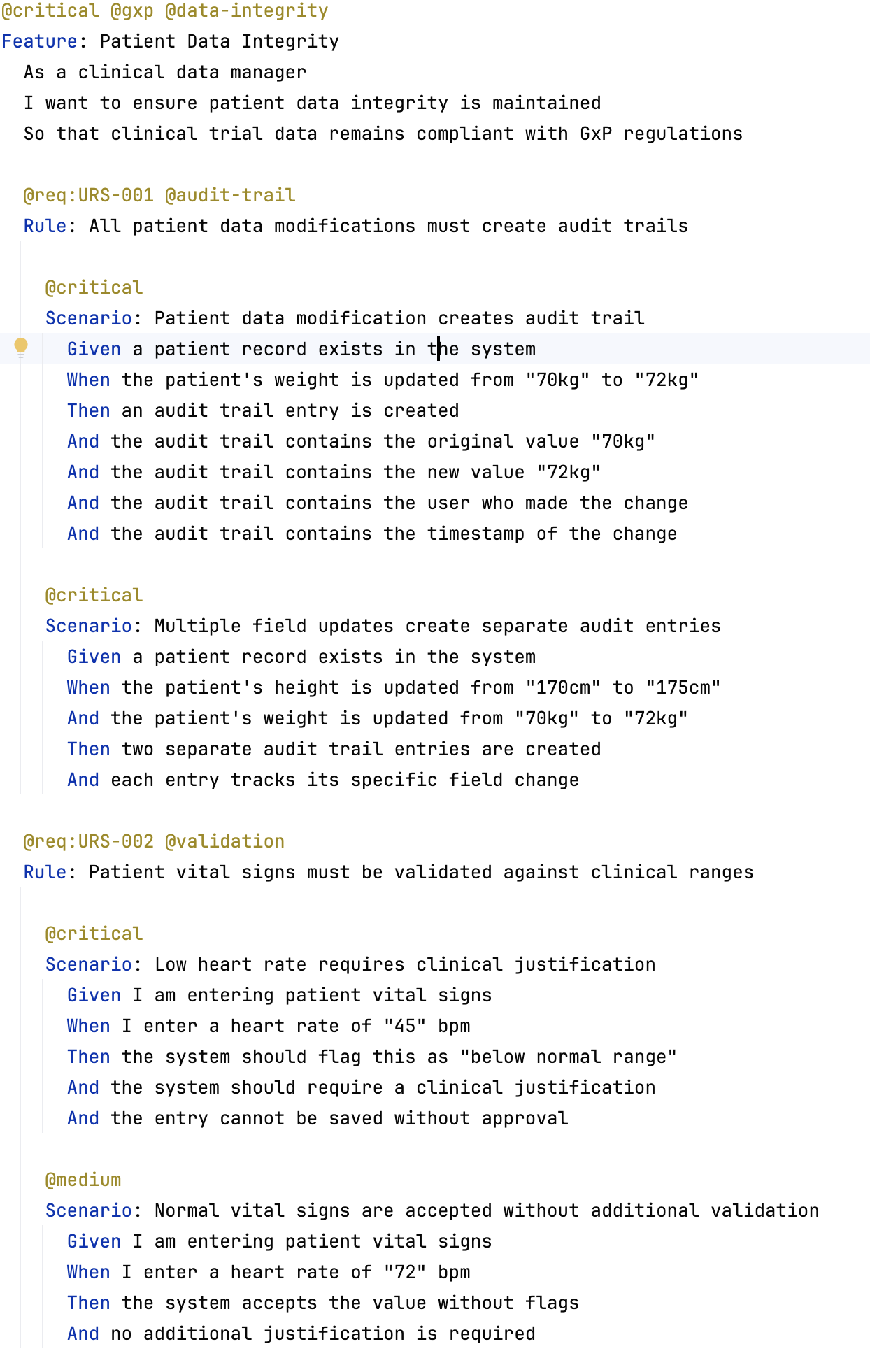
What you see in the image is a specification written in a formal, I.E. executable, language. The language is called Gherkin. As you can see some words are highlighted with a different colour to others. These are keywords in Gherkin. When tooling reads them it will find test cases matching the text that comes after and execute any code in the test cases.
The tags, the words that starts with an @-sign in the specification above, serve as a trace through the test and to the test report. Which will allow the team to automate testing that creates the evidence required.
It also serves as a stored memory for the team. When you return to this specification a while later you will be able to clearly see what you deemed critical last time. Making sure this is considered when you add, remove or modify it this time.
But, a little warning is in place. Tagging is a useful tool but also a tool that needs to be maintained over time. If you don’t need it, don’t use it. When you need it, use it as sparingly as possible. Fewer tags, in fewer places, helps you see them, remember what they are for, and react to them. If you have tags scattered everywhere they become the norm and are quickly ignored, forgotten, and badly maintained.
Executable specifications
I’ve now mentioned formal language and executable language a couple of times. They are not quite the same but for this article we can think about them as such. Any programming language, such as Java, C#, C++, Python, and all the others, are formal and executable languages.
When we use a formal language to write our specifications this means that there is tooling that can read and parse that language. For specification languages such tools then maps the specification to test automation code. Which will test the application code that implements the specification.
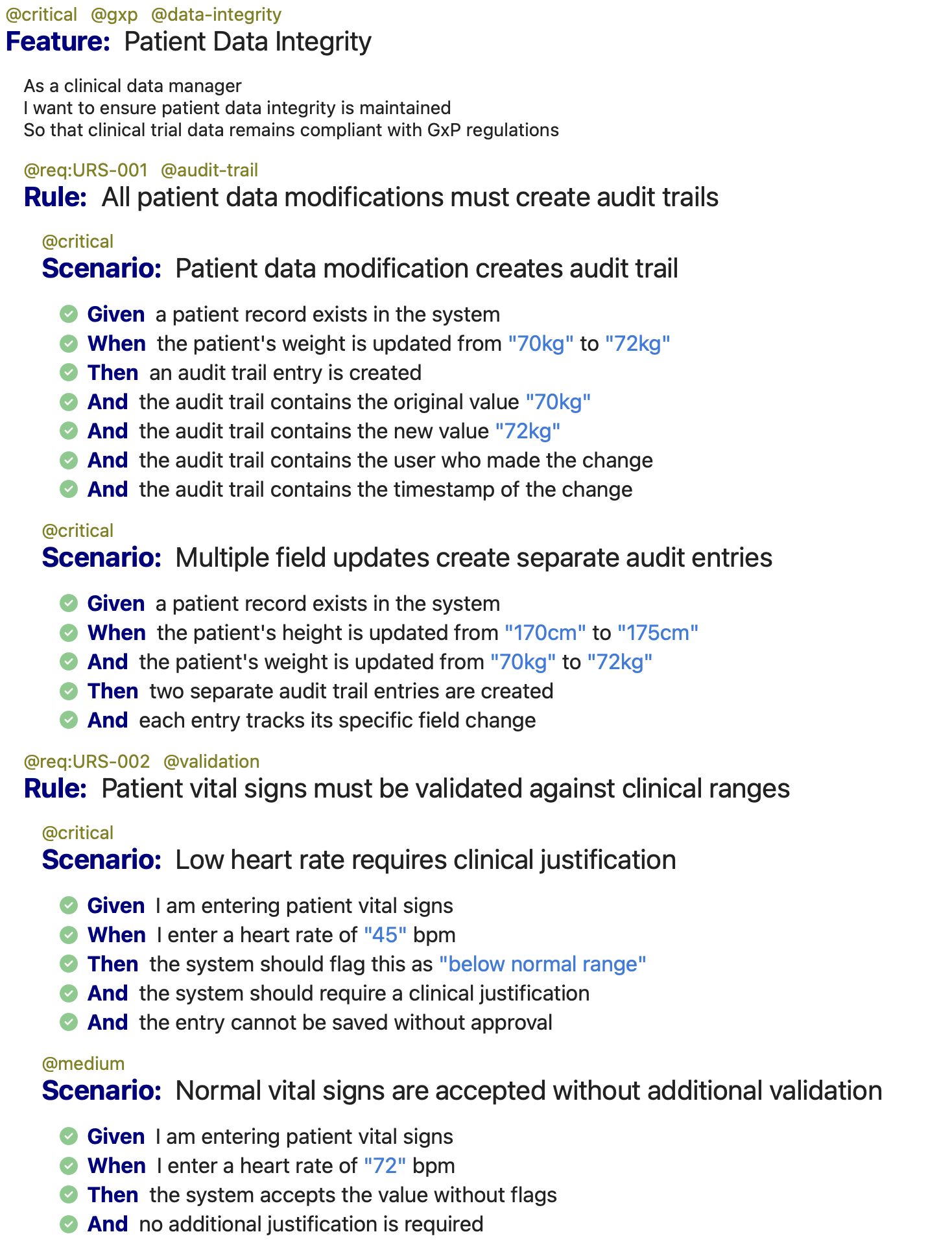
Running the tests will generate a test reports that renders the specification, in the above example as HTML. It will also show which tests passed or failed. As well as means to navigate to the test code and application code that was executed.
This creates a trace that will serve the needs of evidence for an audit report. And it does not need to be in HTML, but can just as well be in PDF or any other format you need.
Version Control Systems
Making everything code, including documentation and specifications, allows us to use the same version control system for everything. This makes it possible to trace all changes, regardless of what changed, in a single timeline. Keeping all changes synchronised.
Source Code Management systems have been used for this purpose by engineering teams for over 30 years. So it is a proven technology. The most commonly used, by far, today is git. This is a low level command line tool with many different capabilities. Many other tools, built on top of git, offer complementary capabilities, such as workflows for approvals, access controls and other types of automation. Some of them are GitLab, GitHub, Azure Devops Git.
This complete, versioned record of changes means audit readiness is a continuous state rather than a periodic panic. Every build, every approval, and every piece of evidence is automatically captured, ensuring that when auditors ask for proof, it’s already there — versioned, traceable, and reproducible.
All of them makes usage of git easy also for people who are not engineers. Making it pretty easy to see the timeline, the changes made, who made what change, who approved it, why it was made.

Above you can see what is called a diff. It shows the difference introduce by a specific change to the timeline. As you can see the visual tool makes it quite obvious what has changed.
When we slice work into thin slices, preferably so small we can do several a day, such diffs are easy to understand and small. Making it very clear to everyone what changed when.
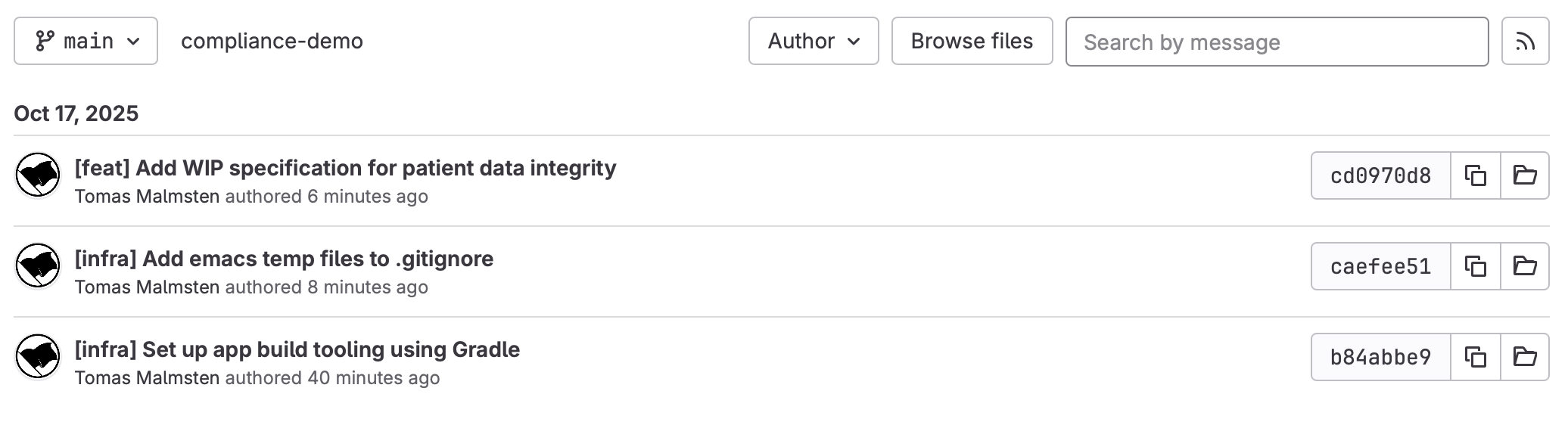
In the change history view it is easy to see what changes have happened. Both the whole timeline from the start, or between one point in time to another. Each change, called a commit in git, can be identified with a hashcode. This hashcode is computed from, among other things, the author of the change, the commit message (the title in the image above), the timestamp the change happened, the hash from the previous commit, and the diff between the previous commit and this one. This makes the hashcode unique for each commit. We can use this hashcode as part of the metadata about each release. Making it very easy to trace exactly what the code repository looked like when that particular release was made.
When a team works together to formulate and write changes there is no need for approvals. However, in some contexts we need to show who were involved. Using the approval workflows in the tooling makes this very easy. And approvals will show in the history (even if they don’t in the image above since it’s from a demo repository that only I worked on).
Since each commit documents what changed, why, who approved it, and when, this also provides an electronic change history that satisfies regulatory expectations without separate manual paperwork.
Continuous Delivery
At this point you may be wondering what continuous delivery (CD) has to do with all of this. I think a little trip into history may be a good start, since that will allow me to frame what I mean when I talk about CD, a term that has seen quite a bit of diffusion over the years.
Teams started pushing the ability to deliver changes to production automatically sometime around 2000. In the mid -00 this was named Continuous Delivery thanks to the first agile principle:
Our highest priority is to satisfy the customer through early and continuous delivery of valuable software.
Emphasis is added by me. For Valuable because delivering non-valuable software is actually worse than delivering low quality valuable software manually. Non-valuable software is waste at the best of times, and directly harmful most of the time. Strong collaboration helps us not just build quality in. It also helps us understand what value we are delivering and making sure we can realise that value.
I should also clarify that I’m not here talking about Continuous Deployment, when every change to the code is automatically deployed to production. This is possible, also in heavily regulated industries. But it requires very mature teams who really knows what they are doing. I think everyone should strive to get there. We should have high aspirations. And every step in that direction is a good step. If you will ever reach that level is not so important though. In regulated industries the last mile of that journey may not even be cost-effective. And that’s OK.
Automate everything we can automate
To lower the bar of actual delivery, I.E. releasing to production, we need to automate it. The building of the software, the testing, the infrastructure, configuration, documentation (as in readable artefacts), the reports, the deployment, and everything else.
If we are starting up something new, my advice is to start here. Since you, when you start, have next to nothing, it’s pretty easy to create the first iteration of automation. From change to production. This will give you a really good foundation to build on. One that, if you don’t, will be much harder to introduce later. From here you can make informed decisions on small changes to the automation as you evolve your solution.
If you already have something, more or less automated, Value Stream Mapping will help guide you to where you should start. It gives you an idea about where your bottlenecks are and which one you should start with. Once you have started you are likely to find that you are starting to turn a vicious cycle around. Giving you energy to continue improving into a virtuous cycle.
The end goal is to make delivery and release so automated that anyone who has access to the button to release can release. This can be the product owner, sales person, QA, or whoever. Without ever risking that the system is in a non-compliant state. Which is key in regulated contexts.
Run it on every change
In CD we run all of this automation every time we make a change. For effective teams this is many times a day. But even if your team is not there, it makes it possible to do many times a week. All the tests, many times a week. Deployment (not to production, but to production like environments) many times a week.
How often do you test everything now? What I often see in teams is that it’s done every couple of weeks. If this was done many times a week the cost of fixing a problem become negligible. And the risk of such problems reaching production low. Meaning the quality of the software is very high.
Each run creates a potential release
Every time we run it we create a potential release. Often called a release candidate. Releasing it is a push of a button so anyone can do it. In regulated contexts this is often where we call in QAs. But thanks to all the collaboration done earlier and all the automation making changes predictable the role of the QA, Product Manager, or other person with the go/no-go decision power from a business perspective don’t need to spend a lot of time on this step. I think you can get it down to five minutes a day reviewing the days work. Then releasing it. Meaning that daily releases really aren’t a big deal anymore.
So, to wrap it all up, Continuous Delivery will increase your ability to deliver changes in the software at speed. But not only that. It will also continuously provide audit ready compliant software, with every release. Shifting compliance from being a documentation exercise done at the end to become an intrinsic property of how you deliver software. Every step of the way from idea to realised user value.
Note: This is a text covering the same topic I covered during the ISPE GAMP CoP 24/10/2025. You can find the slides here and the code here